SSL Certificate Not Trusted Error

 "The security certificate presented by this website was not issued by a trusted certificate authority."
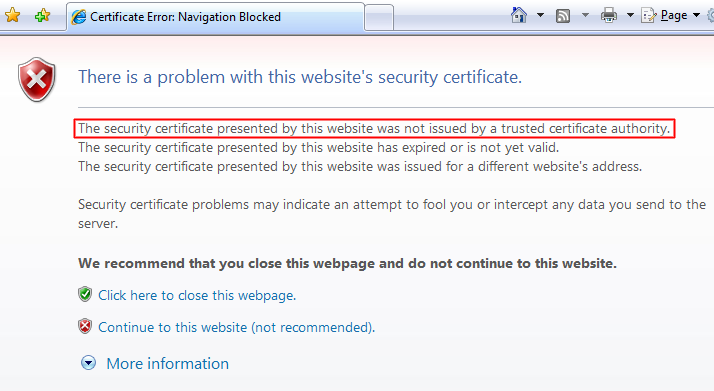
Certificate Not Trusted Error in Internet Explorer 7

The certificate not trusted error indicates that the SSL certificate is not signed or approved by a company that the browser trusts. This occurs most often for one of the following reasons:

  • The web site is using a self-signed certificate. Self-signed certificates can be generated for free but they don't provide as much trust as a commercial certificate. You can tell your browser to trust the self-signed certificate or you can buy (or ask the site owner to buy) a trusted SSL certificate from a certificate authority.
  • The web site is using a free SSL Certificate. Free SSL Certificates are issued by a couple of free certificate authorities but their Root Certificate must be manually imported to each browser to get rid of this error.
  • The web site is using a trusted SSL certificate but it is missing a chain/intermediate certificate. Most trusted certificates require that you install at least one other intermediate/chain certificate on the server to link your certificate up to a trusted source.

The last option is a very common one. For example, if PayPal installed their server certificate for www.paypal.com without installing VeriSign's Class 3 Extended Validation SSL SGC CA intermediate certificate, a web browser would give the certificate not trusted error.
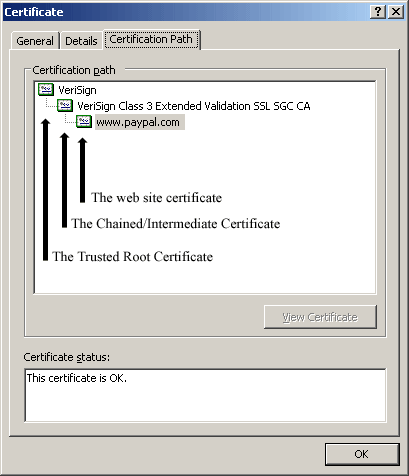
A Certificate's Certificate Path

Occasionally, certain browsers will give this error when others do not.  For example, Microsoft Internet Explorer can automatically download intermediate certificates the first time you visit a site that needs one while Firefox cannot. Once a trusted certificate is installed properly, all browsers will work without getting this error. You can verify whether the certificate will get a certificate not trusted error by using our SSL Checker. The SSL checker uses the latest roots included in Mozilla's Firefox to determine if a certificate is trusted. For specific compatibility of your certificate see, SSL certificate compatibility.

How to Fix The Untrusted Error

To fix this error, you will need to install one or more intermediate/chain certificates onto the web server. If you have any questions about how to do this, contact your certificate authority or follow their SSL certificate installation instructions listed below:

Certificate Provider Links to Installation Instructions
Comodo Comodo Certificate Installation Instructions
InstantSSL Certificate Installation Instructions
DigiCert DigiCert Certificate Installation Instructions
Entrust Entrust Certificate Installation Instructions
GeoTrust GeoTrust Certificate Installation Instructions
RapidSSL Certificate Installation Instructions
GlobalSign GlobalSign Certificate Installation Instructions
GoDaddy GoDaddy Certificate Installation Instructions
Network Solutions Network Solutions Certificate Installation Instructions
Network Solutions list of Intermediate Certificates
StartCom StartCom Certificate Installation Instructions
StartCom list of Intermediate Certificates
Thawte Thawte SSL Web Server Certificate Installation Instructions
Thawte SSL123 Certificate Installation Instructions
Thawte SGC SuperCert Certificate Installation Instructions
VeriSign VeriSign Certificate Installation Instructions
VeriSign list of Intermediate Certificates

Most web browsers make it clear that you shouldn't just continue when you receive this error. This is because, while most of the time it doesn't, it could indicate that a phisher is trying to pass a website off as a legitimate site. You shouldn't have to continue through this error message on legitimate web sites unless the web site owner just doesn't want to spend a little money to buy a trusted SSL certificate. You definitely shouldn't continue through this error on big websites like your bank.

This error is often phrased differently depending on the web browser. These are some common ways the certificate not trusted error is stated in other browsers:

Different certificate not trusted errors in different web browsers

Web Browser  Error Message
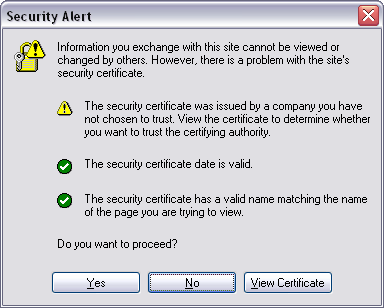
 Internet Explorer 6 "The security certificate was issued by a company you have not chosen to trust. View the certificate to determine whether you want to trust the certifying authority."
 Internet Explorer 7 "The security certificate presented by this website was not issued by a trusted certificate authority."
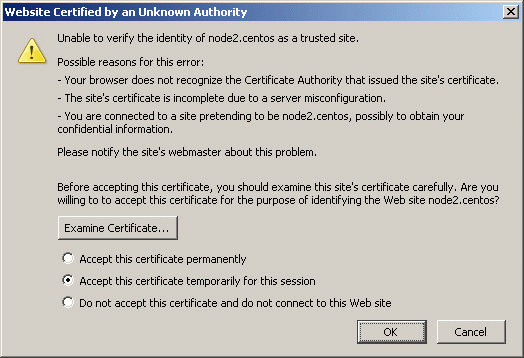
 Firefox 2

"Unable to verify the identity of www.paypal.com as a trusted site.

Possible reasons for this error:

- Your browser does not recognize the Certificate Authority that issued the site's certificate.

- The site's certificate is incomplete due to a server misconfiguration."

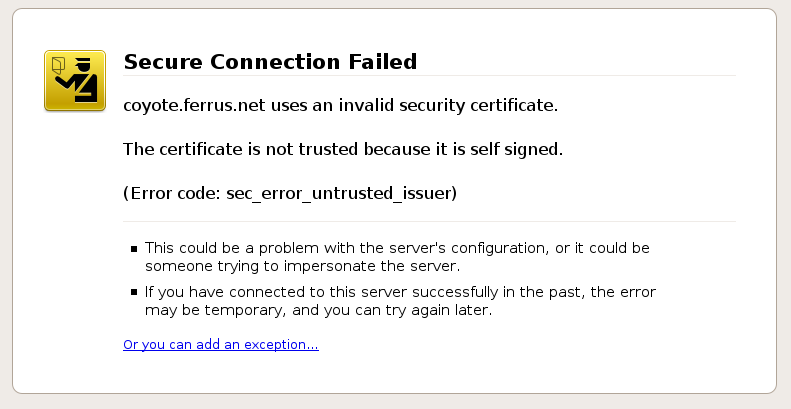
 Firefox 3

 "The certificate is not trusted because it is self signed."

 "The certificate is not trusted because the issuer certificate is unknown. (Error code: sec_error_unknown_issuer)"

 Safari 3  "Authentication failed because the server certificate is not trusted."
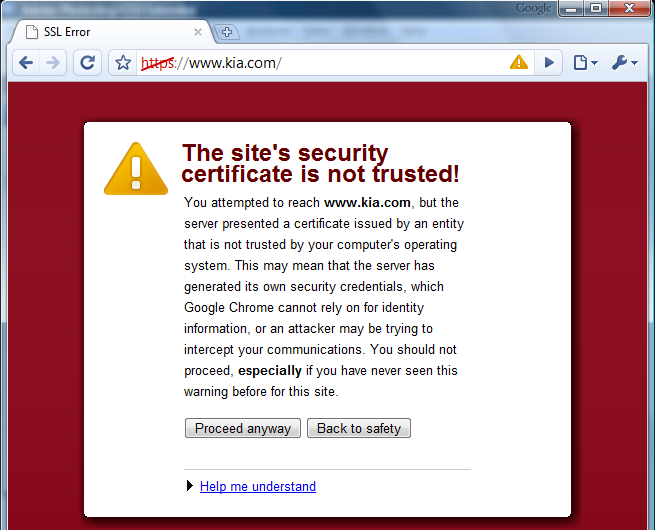
 Google Chrome "The site's security certificate is not trusted!"


Certificate Not Trusted Error in Internet Explorer 6

Certificate Not Trusted Error in Firefox 2

Certificate Not Trusted Error in in Firefox 3

Certificate Not Trusted Error in Google Chrome

 Digg  Slashdot  del.icio.us  Reddit  furl

Posted on November 06, 2008
siteadmin
Posts: 1
Comment
Re: I get this error (firefox only .. )
Reply #11 on : Fri July 30, 2010, 06:54:10
Hi Andrew,

The solution (as stated in the "How to Fix The Untrusted Error" section) is for the administrator of the website to install one or more intermediate/chain certificates onto the web server. If you aren't the web site administrator, you will need to contact them so they can fix it.
Last Edit: July 30, 2010, 06:56:59 by siteadmin  
Andrew
Posts: 7
Comment
I get this error (firefox only .. )
Reply #10 on : Thu July 29, 2010, 13:01:07
I get this error (on firefox only .. )
with geotrust .....
the article does not include a solution ..... or even a proposed solution, completely pointless ...
Robert
Posts: 3
Comment
Re: SSL Certificate Not Trusted Error
Reply #9 on : Wed March 17, 2010, 19:15:51
Hi Paul,

I'm not sure why you would receive the error if the SSL checker didn't report any problems. I'm able to access www.godaddy.com in Firefox 3.6 without receiving any errors. Do you receive a similar error in any other web browsers?
Paul
Posts: 7
Comment
Re: SSL Certificate Not Trusted Error
Reply #8 on : Sun March 14, 2010, 05:02:27
I know this is an old post but I am getting this error with a godaddy cert and the ssl checker says all is good but yet anyone who visits in firefox 3.6 sees site not secure i also get this error going to godaddys site to log in

www.godaddy.com uses an invalid security certificate.

The certificate is not trusted because the issuer certificate is not trusted.

(Error code: sec_error_untrusted_issuer)

Is this on my end or is it there trouble they say I am not getting an error and in not so manny words have called me a lier
Sean
Posts: 7
Comment
clearwire/clear.net
Reply #7 on : Wed December 30, 2009, 09:09:59
I just installed Clear Wimax on two laptops, one running XP the other Vista. Both machines have Chrome and IE7. Using both browsers on both machines I get "untrusted security certificate" Anyone else have this problem? If so, how does one fix this?
Robert
Posts: 3
Comment
Re: Clarification
Reply #6 on : Tue December 15, 2009, 18:09:58
It's true that some browsers allow you to skip or disable this error, but in the vast majority of cases, this error indicates that you are using an untrusted certificate or you haven't installed all of the Intermediate certificates properly. See http://www.sslshopper.com/ssl-checker.html and it should tell you the specific problem.
Unknown
Posts: 7
Comment
Clarification
Reply #5 on : Tue December 15, 2009, 12:13:05
That's not really the case all the time. For example, we have users in an overseas domain that get this error while domestic users do not. That tells me that it can just as easily be a browser issue or security settings issue.
John
Posts: 7
Comment
Thawte Certificates
Reply #4 on : Tue June 02, 2009, 19:52:30
These truly are a load of crap. - I have just tried to install their trial certificate only to find that I could not access their tester because trial certificates do not give you an order number or login details ...and that there is a file, cert, etc. available from Thawte to fix this is a complete and total myth.

On the plus side, the certificate did install without problem, though, and the details were available immediately and it was not necessary to wait several hours for them to be emailed to me.

With the IE problems and lack of tester, though, and proposed 'fix' (mutilating your httpd.conf and .htaccess files) I would say avoid at all costs and use Digicert or Comodo.
Robert
Posts: 3
Comment
Re: I get this error
Reply #3 on : Wed January 14, 2009, 07:09:44
Sometimes you will get this error on certain web browsers or devices but not on others. This could be because the SSL provider is using a new Root certificate that isn't included in the old browsers and devices. The error can usually be fixed by installing an Intermediate certificate that will link the new Root certificate to an old trusted certificate. Check with your SSL provider.
Nick
Posts: 7
Comment
checker
Reply #2 on : Mon December 01, 2008, 21:12:19
I used the checker tool on this site and it said the SSL was fine.
Nick
Posts: 7
Comment
I get this error
Reply #1 on : Mon December 01, 2008, 21:07:35
I started getting this "not trusted" error on one of my sites today. I have not changed anything about the SSL in months. IE, firefox, and google chrome from my office location started giving me the error. My home location and other computers on a different network do not display the error. Any ideas?

Write a comment


If you have trouble reading the code, click on the code itself to generate a new random code.
Security Code:
 
Post Comment