
How to Create a Self Signed Certificate
A self-signed certificate is a certificate that is signed by the person creating it rather than a trusted certificate authority. Self-signed certificates can enable the same level of encryption as a $1500 certificate signed by a trusted authority, but there are two major drawbacks: a visitor's connection could be hijacked allowing an attacker view all the data sent (thus defeating the purpose of encrypting the connection) and the certificate cannot be revoked like a trusted certificate can. We're going to explain when a self-signed certificate should and shouldn't be used and then share tutorials on how to generate a self-signed certificate for common platforms like Microsoft IIS, Apache, and Java Keytool.
When to Use a Self-Signed Certificate
Self-signed certificates or certificates issued by a private CAs are not appropriate for use with the general public.
A certificate serves two essential purposes: distributing the public key and verifying the identity of the server so visitors know they aren’t sending their information to the wrong person. It can only properly verify the identity of the server when it is signed by a trusted third party because any attacker can create a self-signed certificate and launch a man-in-the-middle attack. If a user just accepts a self-signed certificate, an attacker could eavesdrop on all the traffic or try to set up an imitation server to phish additional information out of the user. Because of this, you will almost never want to use a self signed certificate on a server that requires anonymous visitors to connect to your site. In these cases, you really need to lay down a few bucks on a trusted certificate (there are plenty of cheap SSL certificates and even free options). However, self-signed certificates can have their place:
- An Intranet. When clients only have to go through a local Intranet to get to the server, there is virtually no chance of a man-in-the-middle attack.
- A development server. There is no need to spend extra cash buying a trusted certificate when you are just developing or testing an application.
- Personal sites with few visitors. If you have a small personal site that transfers non-critical information, there is very little incentive for someone to attack the connections.
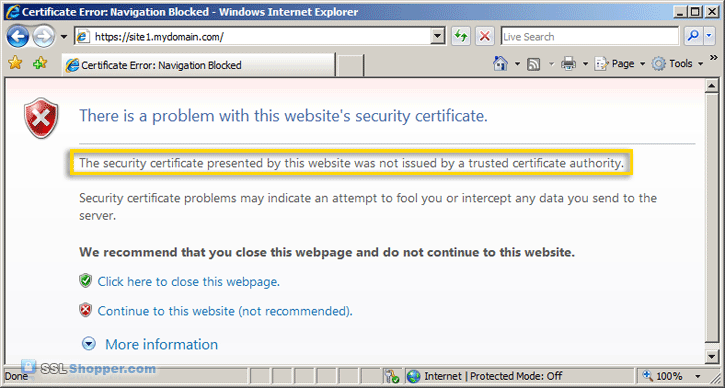
Just keep in mind that visitors will see a warning in their browsers (like the one below) when connecting to a server that uses a self-signed certificate until it is permanently stored in their certificate store.

A Better Option: Private CAs
If you are going to use a self-signed certificate for one of the situations where they are appropriate, it is much better to create your own private CA certificate. This is a more secure option that allows you to avoid warnings like the one displayed above for doing just a little bit more work.
Self Signed Certificates In IIS
Creating a self-signed certificate in IIS 7 is much easier to do than in previous versions of IIS. IIS now provides a simple interface for generating a self-signed certificate. One drawback, is that the common name of the certificate is always the server name instead of the site name. In order to change the common name, you'll need to follow some additional steps.
How to Create a Self-Signed Certificate in IIS 7
Self Signed Certificates for Apache

Creating a self-signed certificate to secure an Apache site requires the use of OpenSSL. This gives you full control over how the certificate is created.
How to Create and Install an Apache Self-Signed Certificate

Self Signed Certificates for Java
Generating a self-signed certificate with Java Keytool is (usually) the simplest of all the platforms, though you don't get quite as much control as using OpenSSL.
How to Create a Self-Signed Certificate using Java Keytool
For more information on creating self-signed certificate, see the following links:
- How to create a self-signed SSL Certificate
- Creating a Self-Signed Certificate using OpenSSL for use with Microsoft Internet Information Services (IIS) 5
- Setting up SSL with a SelfSSL certificate on Windows Server 2003
- Eclectica - Creating and Using SSL Certificates
- G-Loaded - Be Your Own Certificate Authority (CA)
Originally posted on Sat Jun 16, 2007

Comments