
Stop the "page contains secure and nonsecure items" warning

Are your SSL web pages plagued by the browser warning "This page contains both secure and nonsecure items. Do you want to display the nonsecure items?"
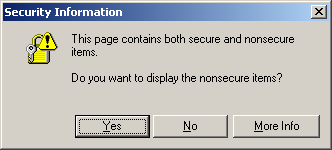
Do you want to display nonsecure items?

This is a common error that occurs when some element on a secure web page (one that is loaded with https:// in the address bar) is not being loaded from a secure source. This usually occurs with images, frames, iframes, Flash, and JavaScripts. There are a few ways to fix it:

1. Change all URLs to https

Just open up the offending web page and search for http://. Change the references on all images, iframes, Flash, and Javascripts to https://. For example.

<img src="https://www.domain.com/image.gif" alt="" />

This may not work if you are loading an image from another site that does not have SSL set up. Also, with this method you'll be loading SSL images even when the client is loading from a non-secure page. This will add extra processing load on the server and client. This is definitely not recommended for a high volume site.

2. Change all links to // or make them relative

Rather than changing all the links to https://, change them to just //

<img src="//www.domain.com/image.gif" alt="" />

Alternatively, if the images or scripts are located on the same domain, you can access them relatively, rather than absolutely:

<img src="image.gif" alt="" />

Using this method, the browser will know that it must load the image securely if the web page is being loaded securely but it will also load the image normally if the page is not being accessed securely. The image will still need to be available on the other server securely. This is likely the best method of getting rid of the pesky "Do you want to display the nonsecure items?" warnings.

3. Change the browser settings

It is best to change the code of the page that is giving the error, but if you don't have access to change the code, you can always tell your personal web browser not to display that message. To do so follow these steps for Internet Explorer:

  1. Go to Tools, Internet Options.
  2. Select the "Security" Tab and then click on the "Custom Level" button.
  3. Scroll down until you see the option: "Display mixed content". Select "Enable".
  4. Click Ok. Then you will get a "Security Warning" pop-up. Click Yes.

One common reason that this warning shows up is using normal Google Analytics code on a secure page. It is a simple fix to enable Google Analytics on a page using SSL.

 Digg  Slashdot  del.icio.us  Reddit  furl

Posted on September 07, 2007
Showing comments 1 to 20 of 22 | Next | Last
Rajesh Mokashi
Posts: 20
Comment
Thanks
Reply #22 on : Mon August 16, 2010, 00:15:15
When i was gone to my clint office i check his Gmail account i got a massage that is "Do you want to display nonsecure items" My clint was really boring. he told me how to disable this popup. I got solution from your website.

Thanks & Best Regards,
Rajesh Mokashi
Kannan
Posts: 20
Comment
Thanks da
Reply #21 on : Thu June 17, 2010, 14:43:20
Thanks... it is very helpful
madjeweler
Posts: 20
Comment
Re: Still occuring
Reply #20 on : Mon May 17, 2010, 21:03:39
Thanks Robert! Your directions worked GREAT:
You should be able to get rid of the error in Internet Explorer by following these steps:

1. Go to Tools, Internet Options.
2. Select the "Security" Tab and then click on the "Custom Level" button.
3. Scroll down until you see the option: "Display mixed content". Select "Enable".
4. Click Ok. Then you will get a "Security Warning" pop-up. Click Yes.
Abdullah Al Mohsin
Posts: 20
Comment
Thanks for help
Reply #19 on : Sun May 09, 2010, 09:59:35
When i open my gmail account than i got a message that is "Do you want to display nonsecure items" it was really boring for me also kill time. i got solution from your website how to change setting.

Best Regards,
Abdullah Al Mohsin
CRR
Posts: 20
Comment
this page contains.........
Reply #18 on : Sat April 03, 2010, 08:24:15
I suffered for many days with this warning. But the direction to enble mixed contents on internet option worked wonderful. Thnks.
prajapati ajay
Posts: 20
Comment
solution
Reply #17 on : Thu April 01, 2010, 04:36:15
thans give to solution
Jay
Posts: 20
Comment
still happening
Reply #16 on : Thu October 29, 2009, 15:33:43
Thanks for the info. but I've follow the steps mention and it did not work.... i'm still having the same problems... any other suggestion?
Robert
Posts: 2
Comment
Re: Still occuring
Reply #15 on : Thu October 15, 2009, 19:01:21
You should be able to get rid of the error in Internet Explorer by following these steps:

1. Go to Tools, Internet Options.
2. Select the "Security" Tab and then click on the "Custom Level" button.
3. Scroll down until you see the option: "Display mixed content". Select "Enable".
4. Click Ok. Then you will get a "Security Warning" pop-up. Click Yes.

If that doesn't do it, you will need to contact the webmaster of your email.
Dianne
Posts: 20
Comment
Still reoccurring
Reply #14 on : Thu October 15, 2009, 16:18:43
The message keeps coming back. It doesn't matter if I check yes or no, it just keeps returning. I have tried it many times.
I also have tried the steps that were given, it provented the message from appearing, but the webpage keeps jumping and blinking as if the message were still working. This is the sign-on page of my email website with all of the jumping and blinking I am unable to sign-on. Is there a way to fix this or totally disconnect this message?
Kenny Ken
Posts: 20
Comment
Thanks
Reply #13 on : Wed October 14, 2009, 04:14:25
Top stuff!
Connie
Posts: 20
Comment
secure and nonsecure popup box.
Reply #12 on : Sun June 21, 2009, 21:01:59
Checking "Enable" doesn't stop it. None of them -- Disable, Enable, Prompt -- stops it from popping up. So.... hello Firefox.
Jemson Sentillas
Posts: 20
Comment
Stop the "page contains secure and nonsecure items" warning
Reply #11 on : Fri May 22, 2009, 12:51:01
Thanks for posting this..

Great job!
Andrew Dove
Posts: 20
Comment
You fixed this constant irritation
Reply #10 on : Wed April 15, 2009, 12:21:50
and kept me sane... many thanks! Was about to remove IE and use firefox instead.

What amazes me is the arrogance of Microsoft in imposing this clunky nonsense, no wonder other people ditch it for other browsers
erhan
Posts: 20
Comment
RE; thankx very useful
Reply #9 on : Fri March 13, 2009, 15:54:34
thanks mate only enabled the display mixed content and all done,,,,

Thanks again
Robert
Posts: 2
Comment
Re: iframes
Reply #8 on : Thu September 18, 2008, 18:02:04
Thanks, Sasor. I updated the page to mention iframes since they can also cause this error.
Sasor Ogar
Posts: 20
Comment
iframes
Reply #7 on : Wed August 27, 2008, 07:43:56
This is very informative, but incomplete. After some boring hours spent on this subject, I found out that though you have all the references relative or starting with "https://", IE still treats the page as non-secure thanks to existing IFRAMEs. For some reason I had to use iframes, but they also cause 'non-secure items' message.
Your welcome :]
Eileen
Posts: 20
Comment
Yeah!
Reply #6 on : Wed August 20, 2008, 10:27:35
Perfect! Thanks for posting this.
Gustavo Sanchez
Posts: 20
Comment
Clear and Concise
Reply #5 on : Sat August 16, 2008, 17:15:42
Many Thanks...this is a invaluable resource in the web...
Robin
Posts: 20
Comment
Thanks!
Reply #4 on : Thu August 14, 2008, 10:29:30
Very Helpful!
candy
Posts: 20
Comment
Thank You!
Reply #3 on : Tue April 01, 2008, 20:47:14
Thank You, Thank You, Thank You. You just saved me weeks worth of work on my site!
Showing comments 1 to 20 of 22 | Next | Last

Write a comment


If you have trouble reading the code, click on the code itself to generate a new random code.
Security Code:
 
Post Comment