
Most Popular

Login:

Your Login Details


Forget Your Password?

Create an account

SSL Certificates in Google Chrome

Google's new web browser, Chrome, has sparked a lot of discussion and interest in many of its new features. Though still in beta, it handles many things much better than all other current browsers. But how does it handle SSL certificates? Does it give the appropriate error messages and user interface notifications? That is what we are going to investigate.

First off, of course, it supports normal SSL certificates without any problem. It just displays a yellow background in the address bar, a lock icon on the right, and makes the https in the address bar green:
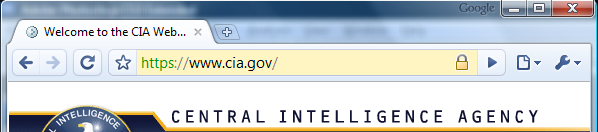
 Normal SSL Certificate in Google Chrome

Support for EV SSL certificates seems a little buggy in the current version. It is supposed to display the name of the validated company in green on the right side of the address bar like this:
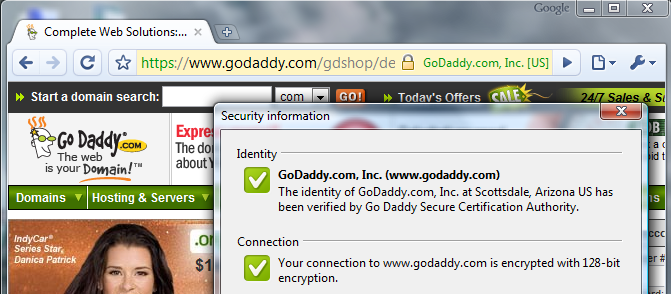
 EV SSL Certificate in Google Chrome

The company name seems to display sometimes and not display at other times. This is a bug that will most likely be fixed by the next release of Googe Chrome.

SSL Error Messages in Google Chrome

How does Google Chrome handle SSL error messages? Very well. First let's look at a domain mismatch error. This occurs when the name on the SSL certificate doesn't match the name that the site is being accessed with in the browser. This is what Google Chrome displays in this case:
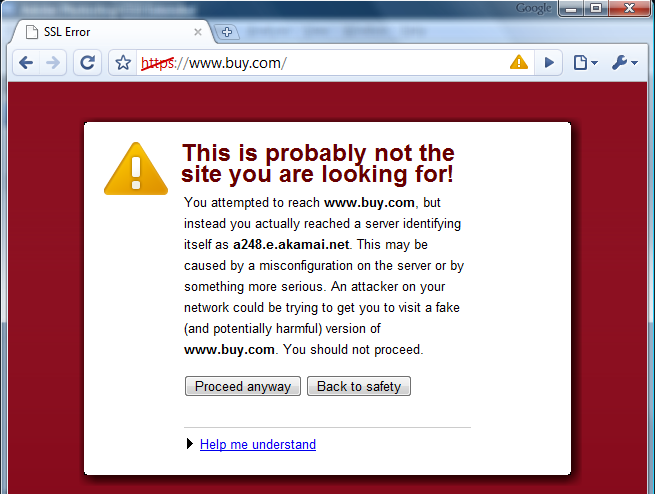
 Domain Mismatch error in Google Chrome

This is a great solution because it makes it very clear that something is wrong but it informs the user of exactly what the problem is and lets them easily proceed if they decide to. This is in contrast to the way Firefox makes you add an exception for each site.

The next error message is an untrusted certificate error (including self-signed certificates or incorrectly installed certificates from certificate authorities). This is the message that displays:
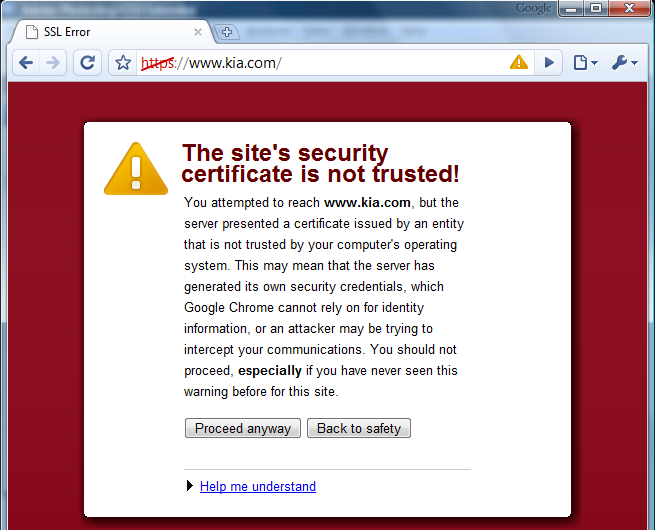
 Untrusted certificate error in Google Chrome

Again, it is very clear and allows you to easily proceed to the page anyway or go "back to safety".

Finally, what does Google Chrome do when some of the content on a page is not loaded from a secure source? It displays a warning icon in the right of the address bar and, when clicked, shows that the identity is verified but that parts of the page are not encrypted.
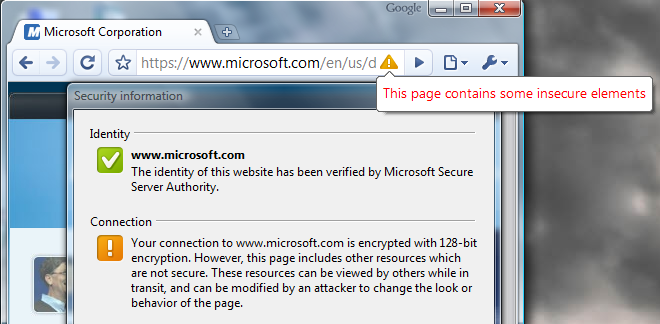
 Unauthenticated content error in Google Chrome

Also, client certificates don't seem to be supported yet. Overall, Google Chrome is on the right track in making sure that SSL errors are correctly identified and communicated to users.

 Digg  Slashdot  del.icio.us  Reddit  furl

Posted on September 07, 2008
Darci
Posts: 8
Comment
certificado ssl
Reply #11 on : Wed June 30, 2010, 16:08:01
a pagina do msn está dando erro de certificado e não entra no meu pc, acho que seja por causa do windows seven, porque em qualquer outro pc eu acesso normalmente. O que pode ser? não estou conseguindo acessar meus EMails porque a pagina é bloqueada só no meu!!!
Mercedes Puchi
Posts: 8
Comment
Error SSL
Reply #10 on : Wed May 26, 2010, 19:08:05
Cada vez que abro Gmail me sale el error, quiero que me ayuden a solucionar esto.-
Frances Fraser
Posts: 8
Comment
Re: SSL Certificates in Google Chrome
Reply #9 on : Tue June 30, 2009, 04:03:40
I much prefer google chrome but will have to use Internet Explorer( which keeps crashing on me) at the income tax site because of problems related to encryption and SSL signing as discussed above. The site does not support Google Chrome.
Robert
Posts: 3
Comment
re: chrome's lack of exceptions is a pain in the A**
Reply #8 on : Tue March 24, 2009, 17:25:40
That's true, doc. It would be nice to have it remember whether you've trusted a certificate before. Of course, for ecommerce sites that doesn't help because customers will be scared away before adding it as an exception. The solution for ecommerce sites is to redirect traffic to www (or vice versa) or get a certificate with both names in it (a SAN/UC certificate)
doc
Posts: 8
Comment
chrome's lack of exceptions is a pain in the A**
Reply #7 on : Tue March 24, 2009, 15:14:36
i have an internal host path to a webserver that i access with a cert that doesn't match the webserver's cert. this is *normal* for people who do web work. it's also *normal* for a non ecommerce site, like an open source site, to have a cert for "www" but not for every sub domain. by not allowing exceptions, they make it VERY hard to work with chrome... which made me, just today, put firefox BACK as my default browser
lojze.kamnik@gmail.com
Posts: 8
Comment
program ne najde certifikata
Reply #6 on : Thu December 18, 2008, 10:55:57
Na brskalniku Google Crhrome bi želel koristiti tudi storitev "abanet"; dostop do ban?nih storitev Abanke katere komintent sem. Za to storitev banke imam registriran certificat "sigenca".
Program Google Chrome pa me ne spusti na program, ker ne najde certifikata, ?eprav ga pod možnosti in naprednimi storitvami programa najdem.
Kaj storiti?
Druga?e pa je brskalnik Google Chrome zelo dober.
Robert
Posts: 3
Comment
Re: certificates handling problem
Reply #5 on : Sun September 28, 2008, 11:15:22
Georgi, I believe this is due to the fact that Chrome doesn't yet support client certificates. I'm sure support for it will be added before the final product is released, though.
Georgi
Posts: 8
Comment
certificates handling problem
Reply #4 on : Fri September 26, 2008, 15:25:07
In fact, Chrome is not applying all my certificates at all. I suppose this is some kind of a bug. I've imported my banking P12 certificates. When a virtual banking site needs the appropriate certificate, Firefox and IE are applying Crypto API as is needed, but the Chrome doesn't. I hope someday Google will fix this AWFUL issue...
Duane
Posts: 8
Comment
EV certs don't do what you think
Reply #3 on : Mon September 08, 2008, 05:37:27
All it takes is for one vendor to issue a certificate by mistake and all vendors cop the blame because there is nothing on the browser interface that effectively communicates who the CA responsible is.

The only websites this is useful for are companies like amazon.com, if the snakeoil sales men hadn't gotten things their way we could easily check the certs our banks use are the right ones based on the information on their stationary.

EV isn't the be all and end all everyone seems to be pushing it as, neither is SSL for that matter, which I wouldn't trust for anything other than credit card transactions especially since a Verisign rep said they would issue duplicated certs to government agencies if compelled, although I'd be interested to know which governments they'd comply with. Then of course no one is going to yank Verisign roots from browsers because their certs are too prolific, the whole thing is a big house of cards waiting to come crashing down, it's not a matter of if, but when.
Robert
Posts: 3
Comment
They had normal certs
Reply #2 on : Sun September 07, 2008, 21:56:44
Duane,

That quote was talking about normal SSL certificates. The whole point of EV certificates is to standardize and make it almost impossible for someone to get a certificate unless they are authorized to do so which will prevent these "black hat" hackers from getting a certificate for a big company or any company that they don't own. It is important for there to be a noticeable difference in the web browser between a normal certificate and an EV certificate or hackers will be able to continue using normal certificates and get away with it.
Duane
Posts: 8
Comment
Nice article
Reply #1 on : Sun September 07, 2008, 21:28:03
Nice review article, although I don't see it as a bad thing if EV extensions are ignored they generally do very little, the following quote comes from a post on one of the XMPP lists:

"Have a look at the latest black hat. They had certs for big corporate sites from some of the bigger CAs. They even rerouted the traffic there and nobody noticed. They showed logs of this at the end of the conference."

Write a comment


If you have trouble reading the code, click on the code itself to generate a new random code.
Security Code:
 
Post Comment