
SSL VPN Servers
What is an SSL VPN Server?
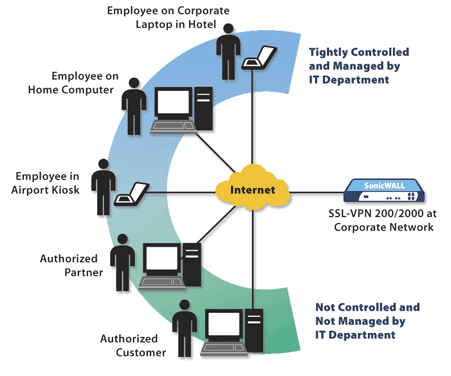 A VPN (Virtual Private Network) simulates a private network over the public Internet by encrypting communications between the two end-points. It allows you to create a separate, virtual network on top of a physical network. For example, you can connect your home computer to the network at your office and have the same connectivity and privacy as if your computer were physically at the office.
Common application used with SSL VPN servers include e-mail, file sharing, remote backup, and remote system management. With SSL VPN security you can securely access your files and applications anywhere in the world.
How does an SSL VPN server work?
An SSL VPN server works by creating a virtual channel over the public Internet using symmetric encryption. Both sides of the channel have keys that are used to encrypt and decrypt the traffic. Because symmetric encryption algorithms (AES, Blowfish, etc.) are so fast, they are used to encrypt the majority of the traffic. However, a different method must be used, at first, in order to transfer the keys to the correct parties. This ensures that you are talking with who you think you are talking to. This is where SSL certificates come into play. SSL certificates use Public Key Cryptography using a public and a private key. Any data encrypted with the public key can only be decrypted with the private key, and vice versa. Once identities are verified, a symmetric key is generated and used to encrypt the rest of the data.
How do you set up an SSL VPN?
To set up an SSL VPN you will need to use a special device or software. If you’re low on cash, we recommend the excellent, free SSL VPN solution OpenVPN. You can also check out one of the following commercial solutions:
SSL VPN Server Links
- OpenVPN
- How Virtual Private Networks Work
- Moving to SSL VPN
- Secure that line!
- Guide to SSL VPNs (US National Institute of Standards and Technology)
- CloudVPN
- What is a VPN and how do you find
the best VPN services?
Originally posted on Sun Jan 18, 2009

Comments