
How to use SSL Certificates with Exchange 2007
The new version Microsoft Exchange, Exchange Server 2007, adds a wealth of new features and makes many things easier to do. Unfortunately, installing SSL Certificates isn't really one of them. Installing an SSL Certificate in Exchange 2007 requires you to run several commands in the Exchange Management Shell. Don't fret yet! If you carefully following these instructions, you'll have your Exchange 2007 server secured in no time!
Determine Your Needs
Unfortunately, you can't just use Ctrl+C and Ctrl+V to copy and paste in the Exchange Management Console. To copy something (like a thumbprint), right-click the shell window and Click Mark. You can then highlight the text that you want to copy and press Enter to copy it. To paste, just right-click and select Paste.
There are several methods of securing your Exchange 2007 server. This article will walk you through the process of ordering a Unified Communications SSL Certificate with multiple domains from a commericial certificate authority and installing it on your Exchange server. Exchange 2007 includes some new features, like Autodiscover, that require multiple names to be secured. There are other methods of securing the additional Exchange 2007 names but the recommended method is to use a Unified Communications Certificate so you only have to worry about one certificate and one IP address.
What names do you need to include? It depends on what services and features you plan to use. At a minimun, you need to include the external name that people use to send and receive mail (mail.yourdomain.com) and the base domain and local name (yourdomain.com and yourdomain.local). You will also want to include the name for Autodiscover (autodiscover.yourdomain.com) so that Outlook 2007 users can use the Autodiscover feature without receiving errors. If you would like to use OWA internally, you will also want to include two NetBIOS names (Server01.yourdomain.local and Server01). So, in a typical scenario, you would include the following names in your UC Certificate:
- mail.google.com
- autodiscover.google.com
- google.com
- google.local
- Server01.google.local
- Server01
For more information about which names to include see the resources in the Links section below. Once you have determined which names you need to secure you are ready to create a Certificate Signing Request and order the certificate.
Can I use a Wildcard certificate?
A Wildcard certificate (*.yourdomain.com) will secure all first-level subdomains of a particular domain. This could work to secure your Exchange 2007 server, but it is not reccomened for these reasons:
- You wouldn't be able to access the server using the internal server name (Server01) because it is not covered by the certificate and you would receive a "name mismatch" error.
- A wildcard certificate is incompatible with POP3 and IMAP4 on Exchange 2007. See Microsoft's explanation of what certificates to use with Exchange 2007 for more information.
Create the Certificate Signing Request
Before you can order an SSL certificate for Exchange 2007, you need to create a Certificate Signing Request using the instructions below:
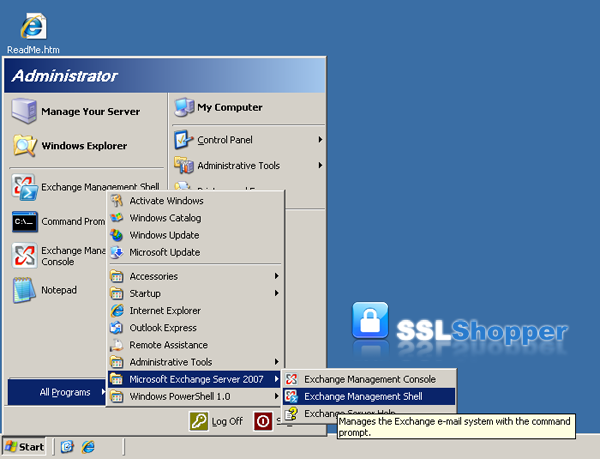
- Click on the Start menu, go to All Programs, then Microsoft Exchange Server 2007 and click on Exchange Management Shell.
-
Run the New-ExchangeCertificate command below replacing the appropriate values with your own. We recommend using DigiCert's New-ExchangeCertificate Command Generator to get a command that you can just paste in.
New-ExchangeCertificate -domainname mail.google.com, google.com, google.local, autodiscover.google.com, server01.google.com, server01 -Friendlyname google.com -generaterequest:$true -keysize 2048 -path c:\certrequest.txt -privatekeyexportable:$true -subjectname "c=US, o=Google Inc., cn=server01.google.com, s=California, l=Mountain View, ou=IT"Name Explanation Examples -domainname Enter all of the names that you determined you needed to secure in the step above. mail.google.com
autodiscover.google.com
google.com
google.local
Server01.google.local
Server01-Friendlyname Any name you want to use to keep track of the certificate on this server. my google certificate -keysize The size of the key that is generated. Bigger numbers are more secure but can be slower. 2048 is recommended 2048 -path The location where you want to save the CSR. c:\certrequest.txt Common Name (cn=) Enter the first name in your list above. This is the most visible name in the certificate (the other names are listed as Subject Alternative Names and they aren't displayed as clearly) mail.yourdomain.com
Organization (o=) The legal name of your organization. This should not be abbreviated and should include suffixes such as Inc, Corp, or LLC. Do not include commas or the command won't work. Google Inc. Organizational Unit (ou=) The division of your organization handling the certificate. Information Technology
WebCity/Locality (l=) The city where your organization is located. Mountain View State/province (s=) The state/region where your organization is located. This shouldn't be abbreviated. California Country/Region (c=) The two-letter ISO code for the country where your organization is location. US
GB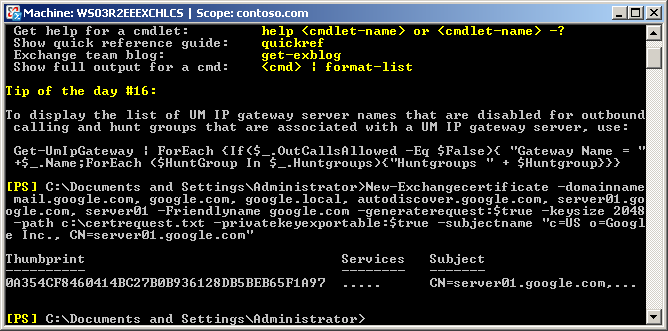
Once you have generated a CSR you can use it to order the certificate from a certificate authority. Not all providers offer Unified Communications Certificates, but you can pick one from our list of Unified Communications SSL Certificates or you can compare SSL UC certificates using the SSL Wizard to find one. Once you find the provider that you want to buy from, click the Buy Now button and go through the order process. You will paste in the CSR and provide information about your company so it can be validated. Once the SSL provider validates your order, you will receive your new UC certificate file.
Install the Certificate
To install your newly acquired SSL certificate in Exchange 2007, first copy the certificate file somewhere on the server and then follow these instructions:
- Click on the Start menu, go to All Programs, then Microsoft Exchange Server 2007 and click on Exchange Management Shell.
- Run the Import-ExchangeCertificatecommand below. Make sure to specify the path to the certificate file you downloaded and remove any services that you will not be using.
Import-ExchangeCertificate -path c:\google.p7b | Enable-ExchangeCertificate -Services IMAP, POP, UM, IIS, SMTP
- If you didn't receive any errors, then it should have installed correctly. Run the Get-ExchangeCertificatecommand to verify that the certificate is enabled for the correct services. If you aren't sure which thumprint it is, you can view the thumbprint of the certificate you just installed by double-clicking it and looking for the thumbprint on the details tab.
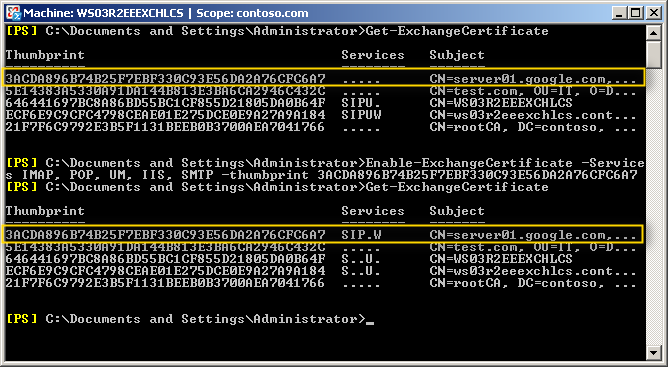
- If the certificate isn't enabled for the correct services (S=SMTP, I=IMAP, P=POP, U=Unified Messaging, W=Web/IIS) you need to run the Enable-ExchangeCertificatecommand below. You can copy the thumbprint from the output of the Get-ExchangeCertificate command that you just ran.
Enable-ExchangeCertificate -Services IMAP, POP, UM, IIS, SMTP -thumbprint 896B74B25F7EBF330C93E56DA2A76CFC6A7 - After running the Enable-ExchangeCertificate command, run the Get-ExchangeCertificate command again to verify that the certificate is enabled for the correct services.
Install any Intermediate Certificates
This step is not necessary if you received a .p7b certificate file from your SSL provider because this file contains all the Intermediate certificates and they are automatically installed. If you received an individual .crt certificate file you may need to follow the instructions in this step.
Most SSL providers issue server certificates off of an Intermediate certificate so you will need to install this Intermediate certificate to the server as well or your visitors will receive a Certificate Not Trusted Error. You can install each Intermediate certificate (sometimes there is more than one) using these instructions:
- Download the intermediate certificate to a folder on the server.
- Double click the certificate to open the certificate details.
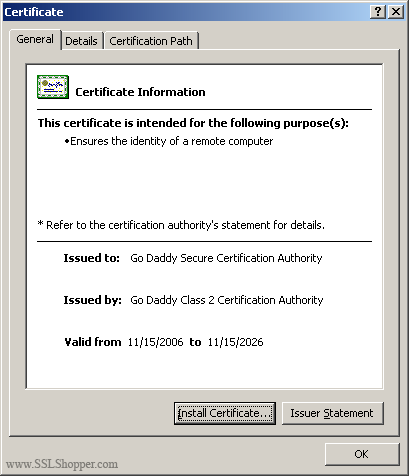
- At the bottom of the General tab, click the Install Certificate button to start the certificate import wizard. Click Next.
- Select Place all certificates in the following store and click Browse.
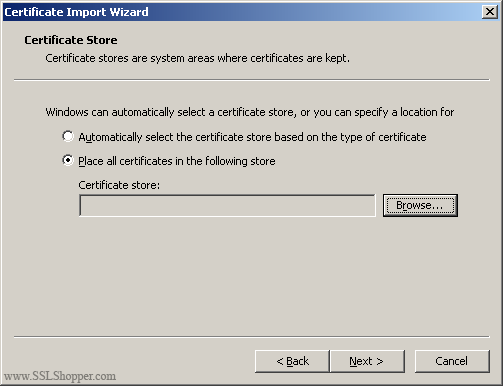
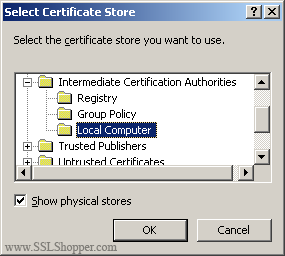
- Check the Show physical stores checkbox, then expand the Intermediate Certification Authorities folder, select the Local Computer folder beneath it. Click OK. Click Next, then Finishto finish installing the intermediate certificate.
You can verify that the certificate is installed correctly by visiting the site in your web browser using https instead of http or using our SSL Checker.
Links
- Move or copy an SSL certificate from a Windows server to another Windows server
- White Paper: Exchange 2007 Autodiscover Service
- Exchange 2007 Autodiscover and certificates
- Exchange 2007 lessons learned - generating a certificate with a 3rd party CA
- Exchange 2007 and SSL Certificates - Take 2
- More on Exchange 2007 and certificates - with real world scenario
Exchange 2007 SSL Certificate Videos
Originally posted on Tue Jul 3, 2007

Comments